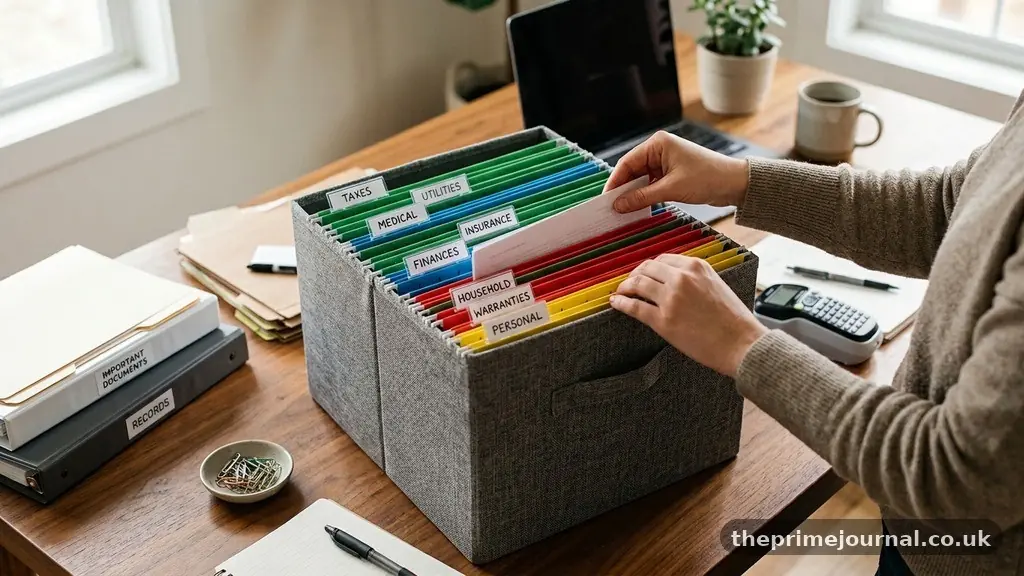
Finding the best ways to organise important documents at home starts with one simple decision: give every paper a named place before you need it. A practical home filing system combines labelled folders, secure storage for originals, and digital copies that can be found quickly during a move, insurance claim, medical emergency, or financial review.
The aim isn’t to create a perfect office archive. It’s to reduce searching, protect irreplaceable records, and make sure another trusted person could locate essential information if you were unavailable. With a short sorting session, sensible document categorisation, and a modest maintenance routine, household paperwork becomes far less intimidating.
Start With a Simple Filing Structure
The best ways to organise important documents at home begin with a structure that is obvious enough to use on a busy day. A useful system separates records by purpose rather than by the room where they were created, so a mortgage document sits with property information instead of disappearing among old household bills.
Begin by gathering paperwork from drawers, handbags, filing cabinets, loft boxes, and email attachments. Don’t sort every page in detail at first; make broad piles for identity, home, money, health, work, vehicles, children, and records that need action.
Once the piles exist, create a small number of main categories. Too many folders create friction, while too few force unrelated papers together and make retrieval slow.
- Identity and family: birth certificates, passports, marriage or civil partnership certificates, adoption records, immigration documents, and copies of identification.
- Home and property: property deeds, mortgage papers, tenancy agreements, inventories, renovation guarantees, and utility account details.
- Money and tax: bank statements, pension information, investment records, payslips, tax documents, invoices, and debt agreements.
- Insurance and health: insurance policies, claim references, medical information, prescriptions, and care arrangements.
- Legal and future planning: wills and estate documents, powers of attorney, trusts, and professional adviser contact details.
- Vehicles, work, and education: vehicle registration, service records, employment contracts, qualifications, and school documents.
- Action required: forms to complete, renewals, bills awaiting payment, and documents needing a response.
Keep the “action required” folder separate from permanent records. A passport renewal form and a birth certificate may relate to identity, but the first needs attention this month while the second is a long-term original.
Use labels that a visitor could understand without asking you for an explanation. “House insurance 2025–2026” is more useful than “miscellaneous,” and “Mum medical information” is safer than a vague folder called “personal.”
Sort Important Documents by Value and Urgency
Not every piece of paper deserves the same treatment. A useful sorting process considers three questions: would replacing it be difficult, would losing it cause financial harm, and would someone need it quickly in an emergency?
Original identity records usually belong in the highest-priority group. Birth certificates, passports, citizenship evidence, adoption papers, and legal certificates can take time to replace, and some organisations require originals rather than scans.
The next group contains documents that prove ownership, rights, or financial obligations. Property deeds, mortgage agreements, pension statements, insurance policies, investment confirmations, and loan contracts should be retained according to their purpose and any relevant professional advice.
A third group contains useful but replaceable information. Routine bank statements, old utility bills, expired warranties, and duplicate receipts can often be stored digitally or disposed of once their practical, tax, or legal value has ended.
| Document type | Priority | Recommended treatment |
|---|---|---|
| Birth certificates and passports | Very high | Secure original storage plus encrypted digital reference copies |
| Wills and estate documents | Very high | Protect originals and tell the appropriate trusted person where they are |
| Property deeds and mortgage papers | High | Keep originals or official records securely; scan supporting documents |
| Insurance policies | High | Keep the current policy, schedule, exclusions, and claim contacts together |
| Tax documents | High | Follow the retention period that applies to your tax situation |
| Routine household bills | Medium or low | Retain while useful, then securely shred or delete after review |
Documents with an expiry date deserve a visible renewal reminder. Insurance policies, passports, driving licences, vehicle tests, professional certificates, and tenancy agreements can all become urgent if their dates are hidden in a deep folder.
A spreadsheet or index can help without becoming another complicated project. Record the category, document name, date issued, expiry date, physical location, and whether a digital copy exists.
Build a Physical Home Filing System
A reliable physical system needs three layers: an active file for current matters, a secure archive for permanent or long-term records, and a temporary inbox for new paperwork. This arrangement prevents every letter from being filed immediately in the wrong place.
Use a sturdy box file, drawer unit, or filing cabinet for records that are consulted regularly. Label folders with plain language, and keep the labels facing the same direction so you can scan the drawer in seconds.
Accordion files work well for compact categories such as vehicle records, school paperwork, and annual tax documents. Lever-arch files offer more capacity, but they can become unwieldy if every family member adds papers without a clear index.
Use colour and naming consistently
Colour coding can speed up recognition, but it should support written labels rather than replace them. For example, blue folders might contain property records, green folders financial records, and red folders urgent or legal material.
Choose one naming style and keep it throughout the home. “Insurance—Home—2025–2026” is easier to find than a mixture of “House cover,” “Aviva,” and “insurance papers,” especially when another person is searching.
Create a document inbox
Place a tray or folder near the point where post enters the home. Every new letter goes there first, giving you one controlled place to review instead of allowing paperwork to spread across kitchen surfaces.
Empty the inbox during a weekly ten-minute appointment. Decide whether each item needs filing, payment, scanning, a reply, or secure disposal, then move it immediately to the correct destination.
Keep receipts and instructions together only when they serve the same purpose. A receipt for a major appliance belongs with its warranty and repair information, while a supermarket receipt usually has no reason to enter the permanent archive.
Don’t punch holes in original certificates or laminate documents unless the issuing authority specifically permits it. Altering the physical format can make some records harder to accept, replace, or authenticate.
Protect Originals From Fire, Water, and Loss
Some important documents cannot be recreated easily, so ordinary filing is not enough. A fireproof document safe can protect passports, birth certificates, wills and estate documents, property records, backup drives, and emergency contact information from common household risks.
Check the safe’s tested protection rating and internal capacity before buying one. A small box may protect paper but leave no room for folders, while a very large unit may be difficult to anchor or move during an emergency.
Water protection matters too. Firefighting water, burst pipes, and basement flooding can damage documents even when flames never reach them. Place sealed document sleeves inside the safe, but don’t assume every waterproof pouch offers long-term protection against humidity.
Keep the safe away from obvious hazards such as boilers, kitchens, garages prone to flooding, and windows that may be forced open. The best location balances security with access, because a container nobody can reach may delay urgent care or travel.
Tell one trusted person where the originals are stored. That person doesn’t necessarily need the safe combination, but they should know the location and understand which documents are inside.
Wills require particular care. In many jurisdictions, the original will matters more than a photocopy, and the executor may need to find it after death, so record the storage location and any solicitor or attorney involved.
Don’t keep every valuable document in one place if a single event could destroy the entire collection. A secure home archive, a protected digital copy, and—where appropriate—a professional or official storage arrangement can provide useful resilience.
Scan Records and Store Them Securely
Digital document scanning reduces the need to handle originals and makes information available during travel, relocation, or an insurance claim. It works best as a backup, not as an excuse to discard documents that must legally or practically be kept in original form.
Scan each page clearly, including reverse sides, stamps, signatures, attachments, and policy schedules. Use a PDF format for multi-page records and name files with the document type, person or property, and date.
A filename such as “Smith_HomeInsurance_Policy_2025-2026.pdf” is much easier to search than “scan0047.pdf.” Add expiry dates to a calendar rather than relying on the filename alone.
Cloud storage can protect copies from theft, fire, and hardware failure, but choose a reputable service with strong account security. Enable multi-factor authentication, use a unique password, and avoid storing the only copy in an email inbox.
Keep especially sensitive files in an encrypted folder or secure document service. Identity documents, tax records, bank details, and medical information should not sit in a publicly shared folder or on an unprotected laptop.
Use digital document scanning in batches. Start with irreplaceable records and current financial or insurance information, then work through older material as time allows.
Make a second backup on an encrypted external drive if the records are critical. Store that drive separately from the main computer, and test that files open properly rather than assuming a backup is usable.
A digital index can connect the physical and electronic systems. Note the file name, cloud folder, physical location, and last review date, especially for documents another household member may need to retrieve.
Set a Document Retention Schedule
A document retention schedule is a written decision about how long each type of record should be kept and what happens afterward. It prevents two common problems: retaining piles of irrelevant paper forever and destroying a record before its tax, legal, insurance, or ownership value has ended.
Retention periods vary by country, tax status, property transaction, business activity, and legal dispute. For tax-related records, use guidance from the relevant tax authority; in the UK, HMRC’s guidance on keeping self-employed records explains obligations that may apply to people running a business.
Keep a written note of the rule you are following rather than relying on memory. If a document relates to a property sale, court matter, inheritance, business, or unresolved complaint, ask a qualified adviser before destroying it.
| Review group | Examples | Decision to make |
|---|---|---|
| Permanent or long-term | Birth certificates, wills, property deeds, citizenship records | Protect the original and maintain a backup reference copy |
| Current-cycle | Insurance policies, annual statements, active contracts | Replace old versions only after confirming claims or obligations are settled |
| Tax and financial | Tax returns, invoices, pension and investment records | Apply the relevant official retention requirement |
| Short-term action | Renewal notices, bills, forms, appointment letters | Set a deadline, complete the task, then file or dispose of the paper |
| Expired and replaceable | Old adverts, duplicate manuals, settled routine bills | Delete digital copies and securely shred paper when no longer needed |
Use a yearly review date for archived material. January, the start of a tax year, or the anniversary of a house move can work well because the date is easy to remember.
Dispose of sensitive paperwork carefully. Cross-cut shredding is preferable for documents containing account numbers, identity details, medical information, or signatures, and recycling bins should not receive intact confidential pages.
Digital deletion deserves equal attention. Remove old files from synchronised folders, recycle bins, shared drives, and backup devices when the retention decision is final and no legal hold applies.
Make the System Easy for the Whole Household
An excellent filing system fails if only one person understands it. Put a one-page map inside the main filing cabinet or safe that lists each category and its location.
For households with children, use separate sections for each child while keeping shared records—such as school policies or family insurance—in a common folder. This avoids mixing a child’s medical information with unrelated household bills.
Partners should agree on access to key records even if one person normally handles administration. A second adult should know where to find passports, insurance details, mortgage information, wills, emergency contacts, and recent financial records.
Keep an emergency information sheet near, but not inside, the safest storage location if appropriate. It can include names, phone numbers, medication details, policy numbers, utility shut-off information, and the location of originals.
Limit the information on that sheet to what is genuinely useful. Full passwords, bank card PINs, and unrestricted account credentials should not be displayed beside a filing cabinet.
Teach children simple document habits as they grow. A teenager can keep school certificates, work records, identification, and vehicle information in a labelled folder, building a routine that will help when they leave home.
Accessibility matters as much as security. If an older adult has limited mobility or eyesight, use large labels, a reachable drawer, and a nominated helper who can retrieve documents without disturbing the entire archive.
Review, Update, and Improve the Archive
Organisation is a maintenance habit rather than a one-off decluttering project. A short weekly check handles incoming paperwork, while a deeper quarterly or annual review catches expired insurance, outdated contact details, and missing scans.
During each review, confirm that current policies are present and that old versions are marked clearly. Keep an old policy if a claim could still arise from its coverage period, but don’t allow five years of superseded paperwork to sit indistinguishably beside the active document.
Check digital copies by opening a sample from each major category. File corruption, lost passwords, discontinued accounts, and failed synchronisation can remain invisible until the day a record is urgently needed.
Update your document index after major life changes. A house purchase, marriage, divorce, birth, death, immigration change, new business, retirement, or serious illness can alter which records matter and who should have access.
Review contact information on insurance policies and legal documents. A solicitor, executor, insurer, financial adviser, or emergency contact may have changed address or telephone number since the document was created.
Invite a trusted household member to test the system. Ask them to find the passport, current home insurance schedule, and will without help; any hesitation shows where the labels or instructions need improvement.
Keep the process encouraging rather than punishing. Filing ten documents correctly today is more useful than waiting for a free weekend that may never arrive.
Frequently Asked Questions
Should I keep paper originals after scanning them?
Usually, yes, for identity records, wills, signed legal agreements, property documents, certificates, and any record an organisation may require in original form. A scan is valuable for reference and backup, but it doesn’t always carry the same legal or practical weight as the original.
Where should passports and birth certificates be stored?
Keep them together in a secure, accessible location such as a locked cabinet or fireproof document safe. Store a clearly named digital copy separately, and make sure a trusted household member knows where the originals are without sharing unnecessary security details.
How should I organise tax documents?
Create a folder for each tax year or reporting period, then separate income evidence, expenses, submissions, payment confirmations, and correspondence. Keep records for the period required by the relevant tax authority, and obtain professional advice if your documents relate to self-employment, property income, investments, or an unresolved enquiry.
Is cloud storage safe for important documents?
Cloud storage can be safer than keeping the only copy on a desk or laptop, provided the account uses a unique password, multi-factor authentication, and appropriate privacy settings. Sensitive documents should be encrypted or placed in a secure document vault, with a second backup available if the information is essential.
How often should a home filing system be reviewed?
Process new paperwork weekly and complete a broader review at least once a year. Add an extra review after moving house, changing insurance, starting a business, welcoming a child, handling an estate, or experiencing any major legal or financial change.
Keep the System Useful
The best ways to organise important documents at home don’t depend on expensive equipment or a perfectly minimalist filing cabinet. They depend on clear categories, safe storage for originals, secure digital backups, and a routine that prevents new paperwork from becoming a second pile.
Start with one tray, a few labelled folders, and the records that would be hardest to replace. Once choosing the Best Ways to Organise Important Documents at Home feels manageable, extend the system gradually and ask another trusted person to practise finding the essentials.